




Your shopping basket is currently empty.
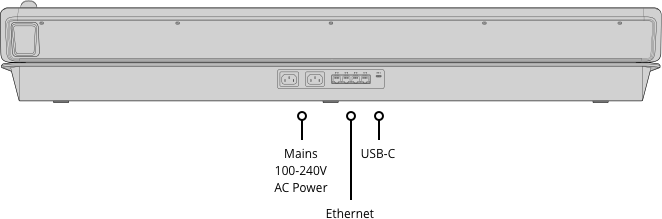
Ethernet
4 x 10/100/1000 BaseT with loop output for additional control panels or computers.

For the ultimate in professional control you can add an optional ATEM Advanced Panel! Although you can use ATEM Constellation with the software control panel, using an ATEM Advanced Panel is so much faster! Or choose the low cost, portable ATEM Micro Panel. ATEM Advanced Panels open up the power of your ATEM Constellation because they give you more control so you can setup more complex effects. It's also a nicer way to work because you have physical broadcast quality buttons, knobs and a t-bar fader so you can access all features in the switcher, all at the same time. Imagine using the 4 M/E model to access all M/Es simultaneously with an input button for every single SDI source!
ATEM Constellation has been designed to give you the most advanced live switching workflow. Internally, ATEM Constellation has separate program and preview buses that you can use to quickly and accurately switch sources. ATEM Constellation lets you see your preview bus selection by using an aux output or on the multi view. Then all you need to do is make selections on the preview bus of the ATEM Advanced Panel, which will appear on your preview screen, allowing you to see your source before it goes on air. Then you can bring the source online by pressing cut or auto! You can also switch sources on the program bus if you need them to go live immediately!
Get total control over your transitions with a dedicated hardware button for each transition type! When selecting transition types, a system control LCD screen will display the options for that transition, so you can change its parameters without navigating through complex menus. It's all instantly available! That gives you multiple ways to switch. Simply select a new source on the preview bus, then press CUT for a cut transition, or AUTO to use the selected transitions such as mix, dip, wipe or DVE! You can even cut directly on the program bus. With ATEM Advanced Panels you get all the controls you need to access all transition types fast.
Power up your wipe transitions by accessing parameters to transform them into exciting effects. While you can select the wipe pattern directly on the LCD, you can also add lots of customization to suit your production style. You can adjust parameters such as symmetry and softness, but there are also adjustments for colored borders with variable width and softness, as well as the position of the centre of the wipe. You can even use the dedicated joystick to set precise wipe pattern positioning!
The system control knobs are ideal when doing chroma keying because you can finely adjust each parameter for clean key edges and seamless multi layer compositing effects. Unlike software control where you need to look at the user interface, the ATEM Advanced Panels have control knobs that you can hold while adjusting key parameters and looking at the video output live to ensure the key is seamless. Only fine adjustment of key settings live while watching the video, ensures your key is perfect.
Amazing live performances often require transitions that need to be controlled manually. The ergonomically designed t-bar control lets you ride transitions perfectly as part of the live performance! Sometimes the emotion of a live event means you need to feel a transition to get it perfectly in sync with the camera operators and talent. Like a conductor, your ATEM Constellation is part of the performance and drives the mood as the production unfolds.
Just below the panel fader bar is the auto transition button. Selecting auto will instantly perform the transition type you have set. This ensures you can accurately select your source and transition type before triggering the action, so you always know what is going to happen and there's much less chance of mistakes going to air. Auto transitions can be programmed for durations from 1 to 250 frames and the benefit is each transition is consistent through your program.
Unlike the simpler front panel on ATEM Constellation, the hardware panel includes a very useful preview transition button that lets you simulate a transition or effect before you use it! The PREV TRANS button helps you avoid on air mistakes when preparing live transitions by displaying the result on your preview video output or on the multiview screen on the ATEM Constellation. Preview transition is the only way to accurately setup complicated transitions and multi layered key effects.
Move elements around the screen using the Joystick! With full 3 Axis control you can adjust X, Y and Z positions of wipe patterns and position the ATEM Constellation DVEs. The joystick control with the DVE is ideal to position live video over video. Scale the size, position up down or left and right for the perfect picture in picture effect. You can also use the joystick to move the DVE and enter start and end keyframe screen positions for your own customized animated DVE moves.
You can select stills from the media pool in the panel LCD menus and simply pressing the media button lets you access the media player and change which image in the media pool is sent to the media player as a video source. You can select any loaded still by scrolling through the list of media pool images, which are listed showing the original file name of each image. This means you can quickly change stills and titles right from the same panel you are working on, eliminating the need to change control panels just to change a title.
Another benefit of the ATEM Advanced Panel is the built in macros, where you can very easily record your own custom macros and trigger them to playback with the push of a button. This means that you don’t need to use a computer to work with macros because you can trigger them from the same hardware panel you are switching from. If you edit or modify a macro the change will appear on all the connected hardware or software control panels because the macros are stored inside the ATEM Constellation itself. You can set up different macros to trigger under each macro button and the thin strip LCD under the buttons will show you which button as which macro you have assigned.
Because ATEM Constellation includes a standard Ethernet connection, you can use this connection to control it remotely from long distances away. The ATEM Advanced Panel, the ATEM Camera Control panel and the ATEM Software Control for Mac and Windows all use an Ethernet connection to the ATEM Constellation, so you can setup any combination of panels you need, for the freedom to decide your ideal control setup. What this means is you can have multiple control panels all working together in parallel and at the same time. Then all these panels can be located anywhere so you could control your ATEM Constellation from the other side of the world!
4 x 10/100/1000 BaseT with loop output for additional control panels or computers.
1 x USB-C for firmware updates.
4
40
80
Tri-Color LED
10 rows 24 character LCD
20
None
4 x Auto, Cut, Tie/Preview
4
Via main menu
4
4 x 20 buttons
4 x 40
24
4
4
4
1
1
ATEM Software Control Panel.

Mac 13.0 Ventura,
Mac 14.0 Sonoma or later.

Windows 10 and 11.
2 x Internal 100 - 240V AC.
Yes
250W

0° to 40° C (32° to 104° F)
-20° to 60° C (-4° to 140° F)
Up to 95%
ATEM 4 M/E Advanced Panel 40
12 Month Limited Manufacturer's Warranty.
 | Manual |


